

How to Automate Invoices from GitHub Issues
Compare custom scripts, n8n integrations, and AI-driven tools like diffbill to automate your client invoices directly from GitHub issues.
title: How to Automate Invoices from GitHub Issues description: Discover how to turn closed GitHub issues and merged pull requests into complete invoice drafts using custom scripts, automation tools like n8n, or AI.
Discover how to turn closed GitHub issues and merged pull requests into complete invoice drafts using custom scripts, automation tools like n8n, or AI.
How do you automate invoices from GitHub issues?
To automate invoices from GitHub issues, you need a workflow that triggers when an issue closes or a pull request merges. This trigger extracts the issue data and sends it to a billing platform as a formatted line item. Developers typically build this pipeline using low-code automation, custom scripts, or AI-driven billing software.

Low-code platforms are a popular starting point for connecting code repositories to accounting software. For example, workflow tools like Make or n8n allow you to sync closed tasks directly to invoicing systems like Invoice Ninja (Source 1, Source 4). These integrations rely on webhooks that listen for repository events and automatically map raw issue titles to your pending invoice drafts.
Key Takeaways
- Set up triggers based on issue closures or PR merges.
- Connect GitHub webhooks to billing tools like Stripe or Invoice Ninja.
- Automate the translation of developer jargon into client-friendly descriptions.
Choosing your automation approach
If you prefer keeping your workflow entirely within your repository, you can write custom GitHub Actions instead of using a third-party platform. Open-source scripts can run automatically on a biweekly schedule or when milestones are reached, parsing issue data to generate basic invoice files (Source 2). While this eliminates external dependencies, you still have to manually edit the output so clients understand the technical work you completed.
Purpose-built billing workflows solve this translation problem by introducing an intelligent automation layer. Instead of pushing raw markdown from a developer task directly into a client bill, these modern tools rewrite technical jargon into clear, professional line items. This ensures your final invoice requires minimal manual editing and is ready to send the moment your repository updates.
Comparing the methods: Scripts vs. Automations vs. AI tools
When you set up billing operations, you can build custom scripts, use API platforms, or rely on specialized software to automate invoicing from a GitHub repo. While writing your own code offers total control, visual automation platforms save development time, and AI tools go a step further by natively formatting the invoice content for your clients.
Custom code solutions, like GitHub Actions workflows, often start as weekend projects but quickly become technical debt. For instance, community-built invoice generators frequently end up archived and unmaintained as the underlying APIs evolve (Source 2). To avoid this hosting and maintenance burden, many developers switch to visual workflow platforms like Make.com or n8n. These tools offer pre-built nodes to sync repository data with accounting software like Invoice Ninja (Source 1, Source 4).
Evaluating the maintenance cost
However, visual API platforms only handle the data transfer. You still face a few hidden workflow costs before an invoice is ready to send:
- You must manually translate technical commit messages and issue titles into client-friendly business language.
- You have to build and maintain custom logic to detect which issues belong to the current billing cycle.
- Handling edge cases, like missing labels or reverted pull requests, requires complex scenario routing.
Dedicated AI tools solve these workflow gaps by managing the entire billing pipeline out of the box. Instead of just moving raw data between two apps, AI-driven billing software reads the issue context, drafts a professional description, and prepares the line items. This shifts your focus from troubleshooting custom logic to simply reviewing the final draft.
Building integrations with GitHub Actions, n8n, and Make
Many developers choose to automate invoices from GitHub issues using visual workflow builders like n8n and Make, or custom scripts running inside GitHub Actions. These platforms connect repository events directly to accounting software, giving you complete structural control over your billing pipeline.
Visual workflow builders
Platforms like n8n and Make.com allow you to connect GitHub events to accounting tools like Invoice Ninja without writing specialized integration code. You can configure automated workflows that listen for closed issues or merged pull requests, and use that trigger to instantly draft a new project task or invoice line item (Source 4). This ensures that your repository activity and your billing system stay perfectly synchronized without manual data entry (Source 1).
Custom code and scheduled actions
If you prefer managing configurations in code, you can run custom Python or Node.js billing scripts directly inside your repository. Many developers fork pre-built open-source tools to fetch issue data, compile the hours, and generate the final PDF invoices automatically. You can tie these scripts to a scheduled GitHub Action, ensuring invoices are securely prepared on a reliable biweekly or monthly cadence (Source 2).
The maintenance tradeoff
While building your own data pipeline is highly customizable, it leaves you entirely responsible for managing the integration logic. You have to handle API rate limits, manually design PDF templates, and set up your own failure alerts in case a webhook silently drops. Ultimately, managing an unmaintained script or a broken Zapier connection can consume the administrative time your automation was meant to save.
The specialized route: AI-driven invoice generation with diffbill
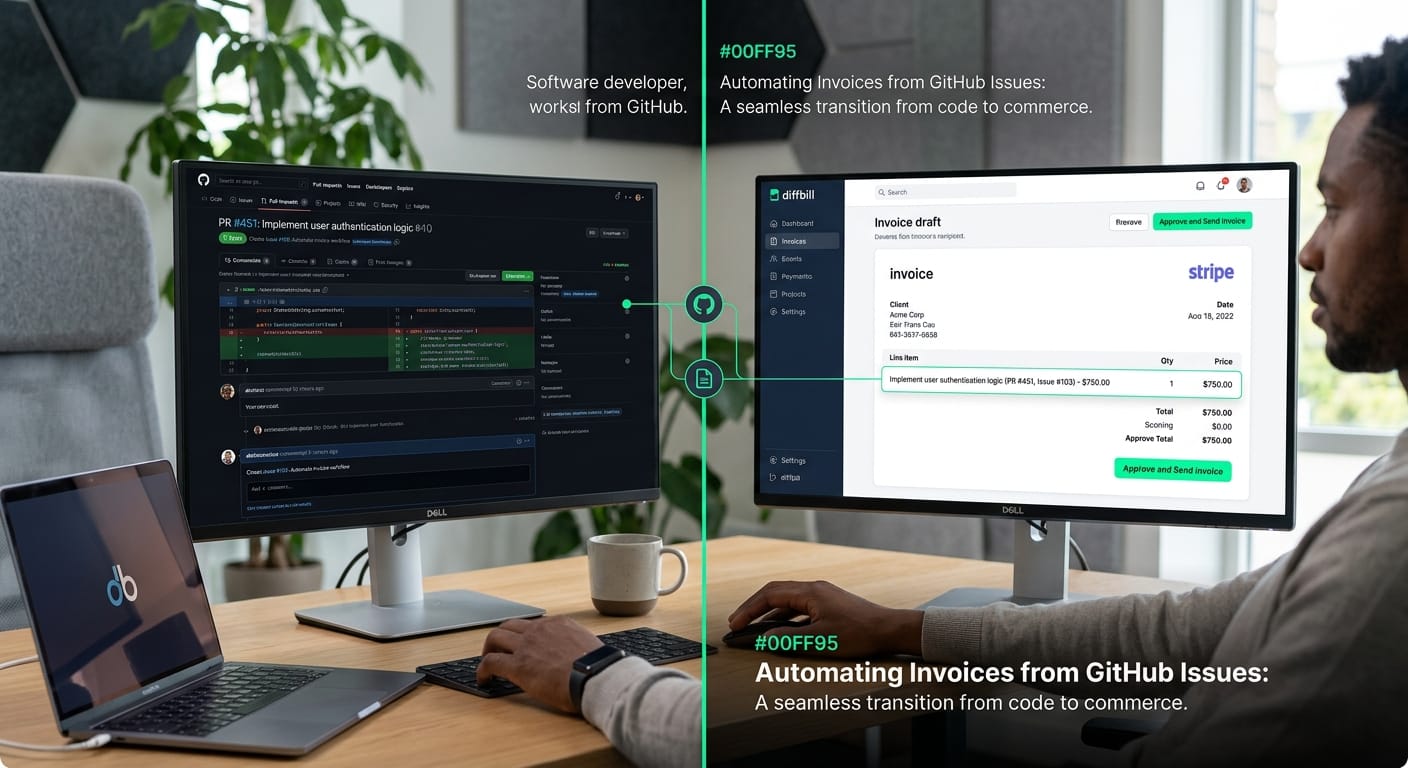
The most direct way to automate invoices from GitHub issues is to use a specialized tool like diffbill that connects your repositories straight to Stripe. Instead of maintaining complex automation maps in generalized tools, diffbill instantly drafts a ready-to-send invoice every time you merge an attached pull request.
While general automation platforms can move raw data between apps, they leave the formatting to you. diffbill solves this gap with an AI layer designed specifically for developers and freelancers. It automatically translates your technical pull request descriptions into professional, client-ready line items directly on the Stripe draft. This means you no longer have to spend your Friday afternoons sanitizing commit messages before billing your clients.
Regain focus with a purpose-built workflow
Building a custom integration using Zapier alternatives like Make.com (Source 1) or n8n (Source 4) requires mapping individual fields and maintaining the logic yourself. diffbill replaces that overhead with a keyboard-first workflow built around the tools you already use.
- Direct connections: Links GitHub and Stripe securely without relying on multi-step webhook catchers.
- Smart redaction: Default filters automatically remove sensitive code snippets before they reach the invoice draft.
- Per-client tone controls: Lets you adjust how technical or high-level the final line items sound for each specific client.
- Source-linked audit trails: Provides complete transparency by linking the invoice items directly back to the deployed work.
When you automate invoices from GitHub issues using a pipeline built for developers, the administrative time savings stack up quickly. By skipping the manual translation and formatting phases completely, freelancers get out of their billing software and back into their editor.
Start billing for free
Frequently asked questions about GitHub billing
Connecting code repositories and financial tools brings up a few common stumbling blocks. Whether you want to automate invoices from GitHub issues for your clients or just locate your own platform receipts, keeping billing administration organized saves you hours of manual data entry every month.
Developers often confuse generating billable client line items with downloading their own subscription receipts. Managing both sides of this financial equation requires different approaches. Handling your outbound billing usually involves custom tracking integrations, while collecting inbound receipts from GitHub just requires querying their billing portal.
When engineering these workflows, you need to decide how much control you want over the final document. A reliable automation pipeline should help you handle a few specific tasks effortlessly:
- Translating technical jargon into clear, professional descriptions.
- Filtering out internal development comments that shouldn't appear on a client bill.
- Syncing completed work directly into your accounting or payment software.
Navigating the difference between custom API integrations and simple invoice collection leaves freelancers with a few recurring questions.