

Invoicing from GitHub: A Complete Guide for Consultants
A comprehensive guide for technical consultants on how to track, manage, and automate client invoicing directly from GitHub repositories.
Learn how to turn GitHub pull requests and issues into professional client invoices, from manual spreadsheet templates to complete automation workflows.
The challenge of billing for GitHub work as a consultant
GitHub does not have a native feature for generating client invoices. To bill from GitHub, consultants must extract completed issues or merged Pull Requests, translate the technical work into business value, and import these items into an external billing system. This invoicing from github for consultants guide explores both manual workarounds and automated pipelines to fix this workflow.
Key Takeaways
- GitHub lacks native client invoicing
- Manual tracking drains non-billable hours
- Automated PR-to-Stripe pipelines are the modern solution
The gap between code and compensation
GitHub is fundamentally built for version control and project management, not accounting. While the platform offers extensive financial tools—such as corporate billing for GitHub Enterprise licenses or paying open-source GitHub Sponsors by invoice—these are designed solely for managing what you owe GitHub. There is no built-in mechanism to flip a resolved consultant issue into a payable client line item.
Without a dedicated billing pipeline, freelance developers typically default to a tedious end-of-month routine. A realistic invoicing from github for consultants guide has to address the major friction points of this old workflow:
- Tracking down deliverables: Digging through multiple repository histories to pinpoint exactly which PRs were successfully merged during the current billing cycle.
- Translating technical jargon: Rewriting shorthand commit messages like "fixed auth bug" into professional client-facing language, such as "Resolved authentication token expiration issue."
- Redundant data entry: Manually copying and pasting these polished descriptions into free invoice management tools or spreadsheets.
This administrative overhead eats directly into your non-billable hours. Relying on makeshift text documents or disconnected billing dashboards requires you to manually sync your development environment with your financial software. Over time, this context switching increases the risk of forgotten tasks, missed line items, and delayed client payments.
Common methods for GitHub-based invoicing
When reading an invoicing from GitHub for consultants guide, you will quickly notice that developers solve billing in three main ways: manual spreadsheet templates, self-hosted open-source software, and modern API automation. The right choice depends entirely on your volume of pull requests and tolerance for administrative overhead.
Many freelancers stick to manual billing strictly because of the status quo bias. Copying and pasting issue details feels safe and familiar, but this habit quietly consumes hours of lost, unbillable time every single month. Moving away from manual data entry frees up your schedule for actual engineering work.
Three ways developers turn commits into cash
- The spreadsheet template method: Often popularized on platforms like Reddit, this approach involves exporting GitHub tickets into developer time tracking software or a spreadsheet. You manually review merged work, translate the markdown jargon into client-friendly language, and copy the details into an invoice document. While free, it scales poorly as your client base grows.
- Self-hosted open-source software: Developers who want complete data ownership often run robust systems like InvoiceShelf. This is a self-hosted platform that helps you privately manage clients and generate invoices from a dedicated server (Source 1). However, maintaining Docker containers and applying security patches creates a new layer of unpaid maintenance.
- Modern API automation: The most efficient route bridges pull requests directly to your billing software. Instead of waiting until the end of the month to compile a list of commits, automation platforms listen for merged code and draft line items in real-time. This helps you automate client invoicing from GitHub activity and entirely removes the copy-paste bottleneck to ensure no billable repository work slips through the cracks.
Step-by-step: The manual GitHub billing workflow
If you are following a standard invoicing from github for consultants guide, the manual route starts with extracting your merged pull requests into a spreadsheet. While this method avoids extra software costs, it requires strict discipline. You must manually audit commit logs, translate jargon into business value, and paste everything into a generic invoice.
The biggest challenge with this approach is the friction it creates at the end of every month. Because native GitHub billing reports focus on enterprise seat licenses and metered action usage rather than specific client deliverables (Source 2), consultants must manually track their own feature work. Sifting through weeks of commit history to summarize what you actually shipped often drains hours of unbillable administrative time.
Filter GitHub activity
Translate technical commits
Draft the invoice
Translating your technical work is often the most tedious phase of this manual process. You cannot simply paste a raw list of bug fixes, dependency updates, and refactored API endpoints into a final bill. To maintain healthy client relationships, you have to carefully rewrite those underlying commits into clear, professional milestones that non-technical stakeholders understand and approve.
Automating your billing pipeline: Merged PRs to draft invoices
This invoicing from GitHub for consultants guide centers on one crucial workflow: moving past manual tracking into an automated pipeline. By connecting your repository to billing tools via webhooks, you can automatically convert a PR to an invoice the moment it merges.
A major hurdle in automated billing is the difference between code commits and client expectations. Your internal commit might read "refactor auth middleware," but your client needs an invoice that says "Implemented secure user authentication system." Dedicated automation workflows solve this by translating raw technical jargon into professional, client-ready line items.
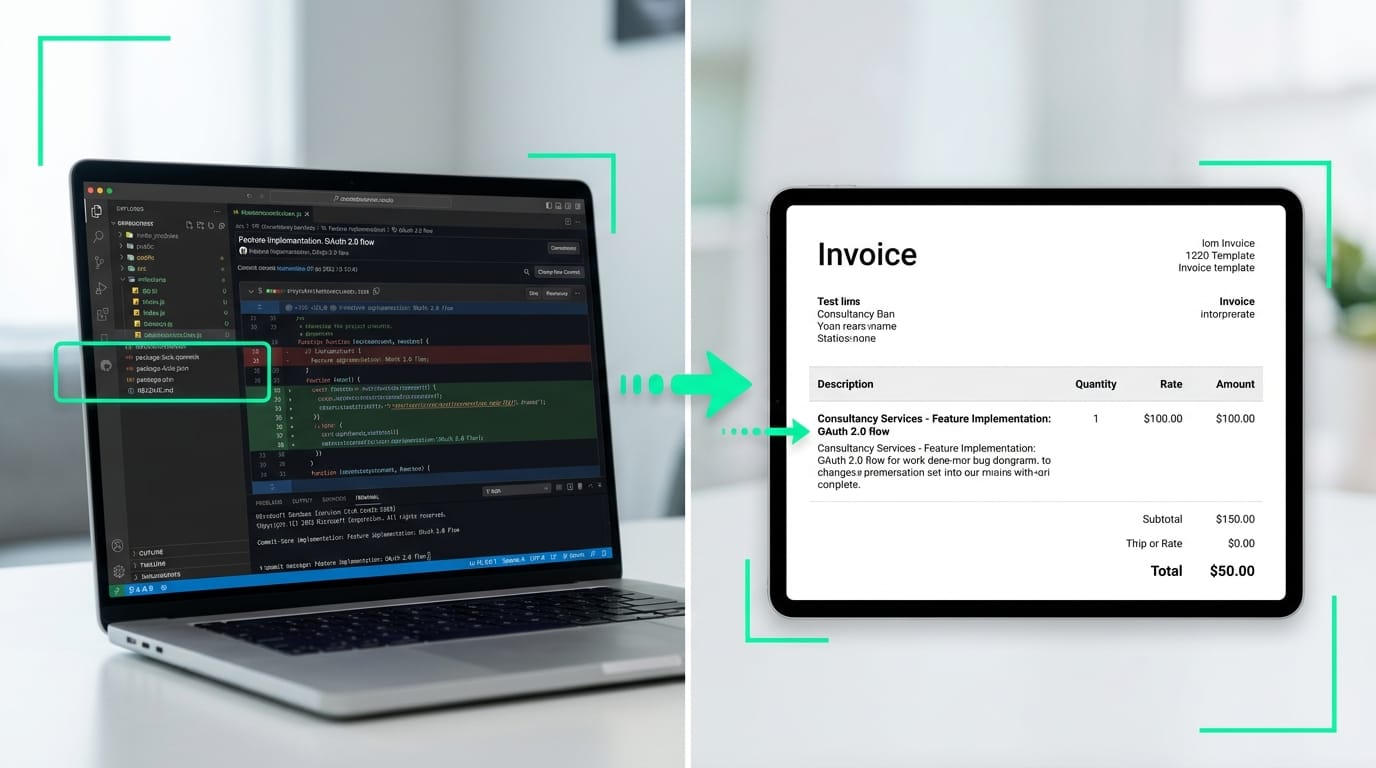
Automating this translation ensures you maintain an objective audit trail for every billed hour or project phase. Linking a specific invoice line directly back to a merged PR provides verifiable proof of work, meaning clients never have to question your deliverables. While standard platform tools help organizations track broad enterprise billing metrics (Source 2), linking individual code diffs to your invoice drafts requires a more specialized, developer-focused approach.
Reducing month-end friction
Relying on a webhook-driven pipeline eliminates the cognitive load and stress of month-end billing. Instead of combing through closed GitHub issues or relying on manual community tools like InvoiceShelf (Source 1) to remember what you shipped, you simply review a pre-populated draft before sending it to the client.
Simplify GitHub invoicing with diffbill
If you want to skip manual spreadsheets, the most effective takeaway from this invoicing from GitHub for consultants guide is to automate the process completely. Diffbill is a purpose-built solution that turns your merged pull requests into client-ready Stripe invoice drafts. Instead of digging through commit histories, you can connect your repositories and let the platform handle the heavy lifting automatically.
Raw commit messages and technical pull request descriptions rarely make sense to non-technical stakeholders. Diffbill uses AI to automatically rewrite your development jargon into clean, professional line items. It pulls your merged work directly and sets up the draft in Stripe, ensuring you never have to copy, paste, or manually decipher old descriptions again.
Scale your freelance workflow with the Pro Plan
For developers managing multiple contracts, the Pro Plan unlocks advanced customization and essential workflow automation. It replaces repetitive administrative tasks with a keyboard-first interface designed specifically for freelancer efficiency.
- Per-client tone controls: Automatically adjust the verbosity and style of your line items to match exactly what each client expects to read.
- Source-linked audit trails: Attach built-in transparency to every Stripe draft so clients know exactly which pull request corresponds to which charge.
- Significant time savings: Skipping the manual translation step saves roughly 5 minutes per PR, which reclaims hours of billable time every month.
Stop wrestling with end-of-month administration and focus on the code you ship.
Start billing