

The Ultimate Guide to AI Invoice Generators for Freelance Developers
Learn how AI invoice generators save freelancers time by automatically rewriting technical work into professional bills. Compare generic templates with true automation.
Discover how an AI invoice generator for freelancers can transform technical work logs into professional, client-ready bills, saving you hours of unbillable administrative work every month.
What is an AI invoice generator for freelancers?
An AI invoice generator for freelancers is a tool that translates raw work data—like project notes or code commits—into professional invoice line items, eliminating manual data entry.
Key Takeaways
- Automatically rewrites jargon into client-friendly language.
- Connects directly to your payment gateways.
- Eliminates hours of unbillable administrative work.
Not all billing tools use artificial intelligence in the same way. Design-focused platforms like Canva and Venngage primarily offer static, drag-and-drop templates to make your bills look aesthetically pleasing (Source 4, Source 5). While these help you build a pretty PDF, they still require you to manually calculate hours, copy over task descriptions, and format every single line item yourself.
Going beyond visual templates
True AI billing apps handle the structural data entry for you. For example, QuickBooks offers a feature that pulls directly from copy-pasted project notes to autofill pricing, descriptions, and customer information (Source 2). Other platforms like Bookipi bundle invoicing into a larger suite of AI-powered CRM and scheduling tools to keep all your business operations in one single flow (Source 3).
For technical consultants and developers comparing developer invoicing software, the most valuable AI tools act as a translation layer. Instead of just dropping your raw timesheets or highly technical pull request summaries into a document, the software actively rewrites that jargon into language a client's accounting department will actually understand and approve. By bridging the gap between your development workflow and the final billing draft, you get paid faster without the administrative headache.
Generic invoice templates vs. workflow-specific AI
Most developers stick to what is familiar: manually typing hours into beautiful, empty document templates. But switching to a workflow-specific ai invoice generator for freelancers changes the equation entirely. Instead of just making a PDF look pretty, these tools automate the actual data entry by turning raw code changes into professional billing line items.
Mainstream design platforms like Canva and Venngage are excellent for typography and brand kits. They offer thousands of industry-specific layouts and simplified drag-and-drop editors to help documents stand out (Source 4; Source 5). However, relying on these generic visual templates feeds a costly status quo bias. You are still forced into the unbillable routine of digging through your commit history, copying your work, and translating complex technical jargon for a non-technical client.
Breaking the manual data entry habit
Workflow-first alternatives take the exact opposite approach by focusing on the actual data pipeline. A platform like Diffbill connects straight to your codebase to automate client invoicing from GitHub activity so you never have to manually categorize development tasks again. It automatically groups your merged pull requests and applies context-aware AI to rewrite your developer shorthand into clear, business-friendly language.
By prioritizing the data integration over the document design, workflow-specific tools fundamentally accelerate the billing cycle. You spend less time trying to remember what you shipped three weeks ago, and your clients receive a highly transparent, source-linked audit trail of your exact contributions.
Key features to look for in AI invoicing tools
The right ai invoice generator for freelancers should do more than just slap your logo on a PDF document. Look for platforms that translate raw technical work logs into professional billing descriptions automatically. Essential features include source-linked audit trails, customizable tone settings, and measurable time savings.
Many free invoice management tools for contractors focus on visual template catalogs or simple payment links (Source 5). While some offer basic AI to autofill text notes into an invoice line item (Source 2), a tech professional's workflow demands deeper context. Your billing software should integrate with your development history directly so you never have to copy and paste manually.
Core capabilities for technical workflows
Look for these specific features when evaluating an ai invoice generator for freelancers to ensure it actually speeds up your administrative work:
- Source-linked audit trails: Clients need to trust the hours you bill. The best tools map every generated line item back to its specific pull request or codebase change for complete transparency.
- Tone and verbosity controls: A non-technical founder needs different invoice details than an external engineering manager. Per-client settings let you dial the technical jargon up or down so your customer always understands what they are paying for.
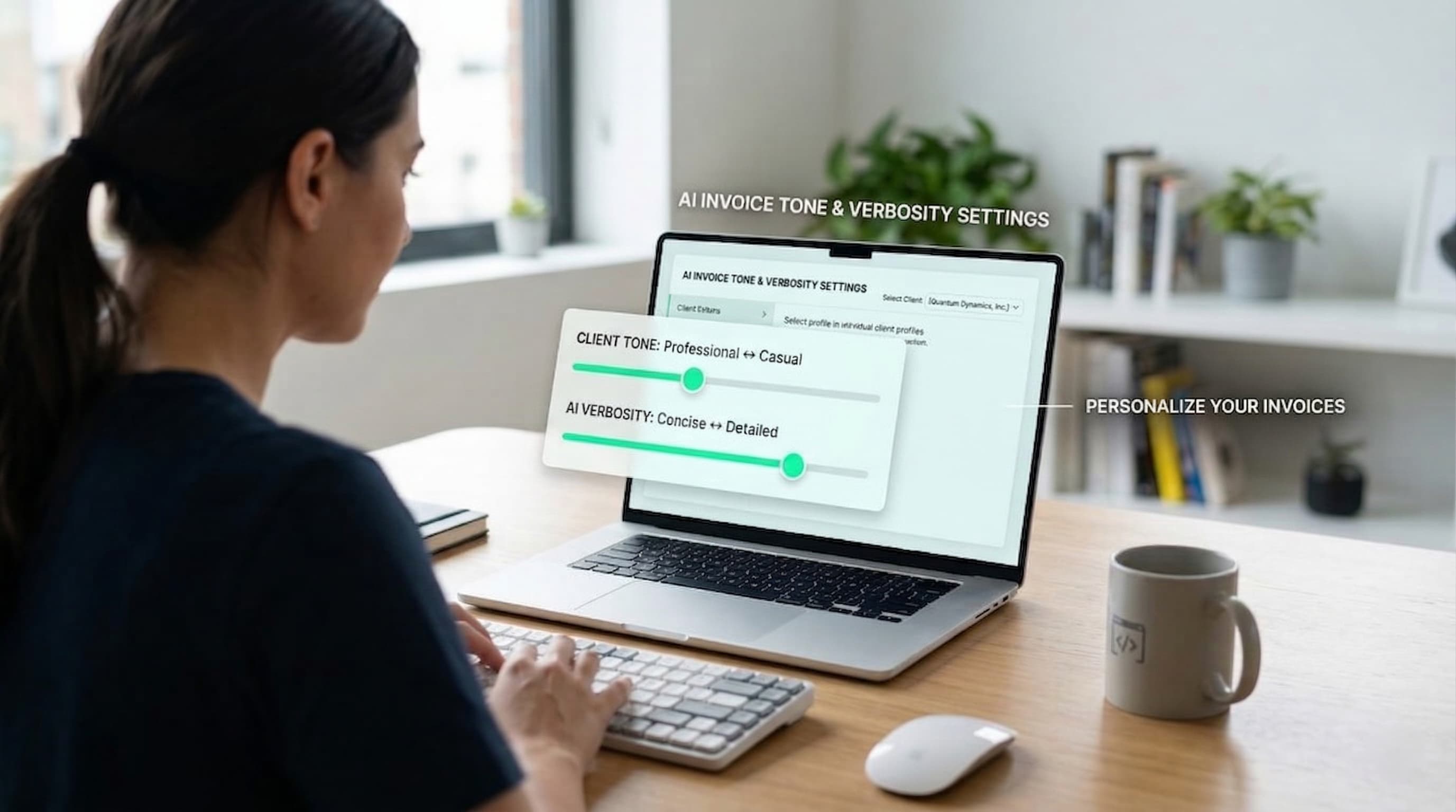
When you automate the translation of technical work into client-ready bills, the productivity gains become obvious quickly. Tracking down pull requests and writing summaries manually drains your unbillable time every month. A purpose-built tool removes that friction entirely.
How to automate developer invoices in 3 steps
Unlike generic templates that demand manual data entry, a developer-centric ai invoice generator for freelancers builds your billing directly from your version control. By connecting your GitHub repository to your Stripe account, you can translate a merged PR to client-ready line items and billing drafts without typing a single summary.
Most traditional invoicing platforms, such as the visual template generators seen in Source 4 and Source 5, still require you to translate your own technical work logs into business-friendly language. A code-aware automation tool flips this script. It seamlessly extracts the raw commit data you already wrote and relies on AI to reframe it for non-technical stakeholders.
Connect your workflow
Merge and generate
Review and send
The value of a transparent audit trail
Once this pipeline runs in the background, you completely eliminate the frantic end-of-month scramble through your branch history. Your clients receive clear, professionally formatted line items that easily justify the tracked hours. Meanwhile, you preserve a verifiable link back to the original source code.
This streamlined approach keeps your focus firmly on shipping code. Instead of burning your unbillable weekend hours playing catch-up in a spreadsheet, you can leverage billing automation for your software development lifecycle to let the system handle the administrative heavy lifting.
Ready to upgrade your freelance billing strategy?
Every minute you spend manually formatting tables and rewriting technical work logs into summaries is unbillable time you lose forever. Upgrading your workflow with an ai invoice generator for freelancers and adopting proven developer invoicing automation strategies lets you skip the administrative busywork and get straight to getting paid.
Automate your workflow with Diffbill
While generic billing apps require endless copying and pasting, holding onto your old manual habits means throwing away hours of potential coding time each month. Diffbill reclaims that lost time by transforming your merged GitHub pull requests directly into client-ready Stripe invoice drafts.
Created specifically for developers, Diffbill’s Pro Plan replaces generic templates with targeted features that keep you focused on shipping code:
- Keyboard-first workflow: Navigate your billing dashboard and generate drafts quickly without reaching for your mouse or breaking your rhythm.
- Per-client tone controls: Automatically translate highly technical commit histories into professional, easy-to-read language tailored to each specific client.
- Source-linked audit trails: Attach verifiable GitHub links directly to your Stripe line items so clients can clearly see the work completed.
You already did the hard work of writing, testing, and shipping the codebase. Stop losing money to repetitive administrative tasks, and let Diffbill handle the translation and formatting for you.
Start billing