

How to Translate Technical Work for Client Invoices
Stop confusing clients with Git commit logs. Learn how to translate technical development work into professional, value-driven invoice descriptions.
Learn how to rewrite complex GitHub commits and technical jargon into clear, business-focused invoice line items so you get paid faster and avoid billing disputes.
Why business-friendly invoice descriptions matter
Your primary goal when sending an invoice is to get paid quickly and without friction. By translating technical work for client invoices into clear business outcomes, you bridge the gap between complex engineering tasks and measurable value. Clients approve payments faster when they understand exactly what they bought.
The stakeholders reviewing your billing statement are rarely the same engineers reviewing your pull requests. If an account manager or finance director sees a line item for "refactored GraphQL resolvers," they might flag the invoice for review. This confusion breaks payment momentum and forces you into lengthy email threads to justify your logged hours.
How clear descriptions prevent payment delays
Framing your work around the client's business goals removes the friction from the approval process. A well-crafted transaction record that meets all legal requirements for freelance developer invoices provides transparency that builds trust and helps prevent disputes. To keep your cash flow consistent, reshape your technical updates to focus on the end user:
- Instead of: "Optimized database indexing."
- Write: "Improved application page load speeds for better user retention."
- Instead of: "Fixed async race condition in Redux store."
- Write: "Resolved an intermittent checkout bug to prevent dropped shopping carts."
Financial gatekeepers cannot schedule your payment without recognizable, justified deliverables. When handling late payments as a software contractor, you will often find that most delays happen precisely because the person approving the document lacks the clear details they need. Mastering the habit of translating technical work for client invoices gives those administrators the exact context required to greenlight your payment immediately.
Core elements to include in your freelance developer invoice
A professional invoice requires precise structural details to get approved quickly by client accounting teams. While translating technical work for client invoices is critical for showing value, your document must also include accurate business details, specific billing contacts, tax identification, and clear payment terms to avoid processing delays.
Key Takeaways
- Clear, translated service descriptions
- Dates and precise scope of work
- Unique invoice sequential numbers
Most payment delays occur simply because the invoice lacks the precise details the client's accounts payable department needs to release funds. You should clarify exactly who the invoice belongs to and what reference numbers are required before the project even begins. Addressing the document to a generic company inbox often leaves your payment stuck in administrative limbo.
Essential components for fast approval
Beyond the translated descriptions of your code shipments and pull requests, ensure these administrative details sit prominently at the top of your document:
- Your business identity: Include your legal name, physical address, contact details, and tax identification number. Providing a tax code establishes immediate professionalism, even if you operate as a sole proprietor.
- Precise client details: Add the specific contact person handling your account, their department address, and any mandatory purchase order or commission reference numbers.
- Invoice logistics: Clearly label the document with the word "Invoice," feature the issue date prominently, and practice a consistent sequential numbering system. Many freelancers use a combination format, like merging the client code with the current date, to prevent duplicate statements.
How to translate technical work into client-ready line items
The most effective way to approach translating technical work for client invoices is to focus entirely on the business value of your code. Instead of billing for specific server configurations or refactoring efforts, rewrite your development logs to highlight the user impact. This level of clarity prevents billing disputes and helps non-technical stakeholders approve your invoices faster.
Moving from a merged PR to client-ready line items enhances your professionalism and helps clients understand exactly what they are paying for. When your invoice speaks the client's language, they can authorize the payment immediately without asking a technical lead to decode the work. Having the precise details ready for the person approving the invoice is essential, as missing administrative data is a common bottleneck for payment delays.
A three-step framework for clear line items
Audit shipped PRs
Remove developer jargon
Focus on business value
To make this process repeatable, group your pull requests by the user-facing feature they support before you draft your descriptions. Rather than creating a dozen confusing line items for small backend fixes, consolidate those commits into a single, cohesive update.
Following this approach creates a sharp contrast between internal developer notes and polished client updates:
- Before: "Refactored payment gateway API to handle async timeouts and fix auth middleware."
- After: "Improved checkout reliability to prevent dropped customer payments during high traffic."
Examples of technical vs. translated invoice descriptions
The secret to successfully translating technical work for client invoices is turning raw code commits into clear business outcomes. While a developer log explains how you altered the codebase, a polished billing description explains the tangible value delivered. This approach ensures your client immediately recognizes the return on their investment.
Most payment delays occur because billing documents lack the precise details that the person approving the invoice needs. Non-technical stakeholders rarely understand database migrations, dependency updates, or API refactoring. By converting complex jargon into everyday language, you provide the clarity necessary to get paid faster and avoid disputes.
Real-world coding versus billing descriptions
| Raw Pull Request | Client-Ready Line Item |
|---|---|
fix: regex parse error in auth flow | Resolved user login validation issues |
feat: implement redis caching | Improved application performance and load times |
chore: update webpack config | Optimized site structure to reduce load metrics |
Seeing the stark difference between a raw developer log and a polished line item clarifies the standard you should aim for. When translating technical tasks into billing hours, always focus on how the codebase change positively impacts the underlying business. Rely on these specific framing strategies:
- Backend fixes: Shift the description away from the specific bug and toward the restored user functionality.
- Frontend updates: Focus on visual improvements and user experience rather than the specific CSS frameworks or libraries you updated.
- Infrastructure tweaks: Connect server maintenance or database optimizations directly to improved security, speed, or cost savings.
Providing this level of transparent detail enhances professionalism and helps foster a stronger working relationship. Clients feel much more comfortable paying a translated invoice when they clearly understand the functional upgrades they purchased.
Manual rewriting vs. automated workflow
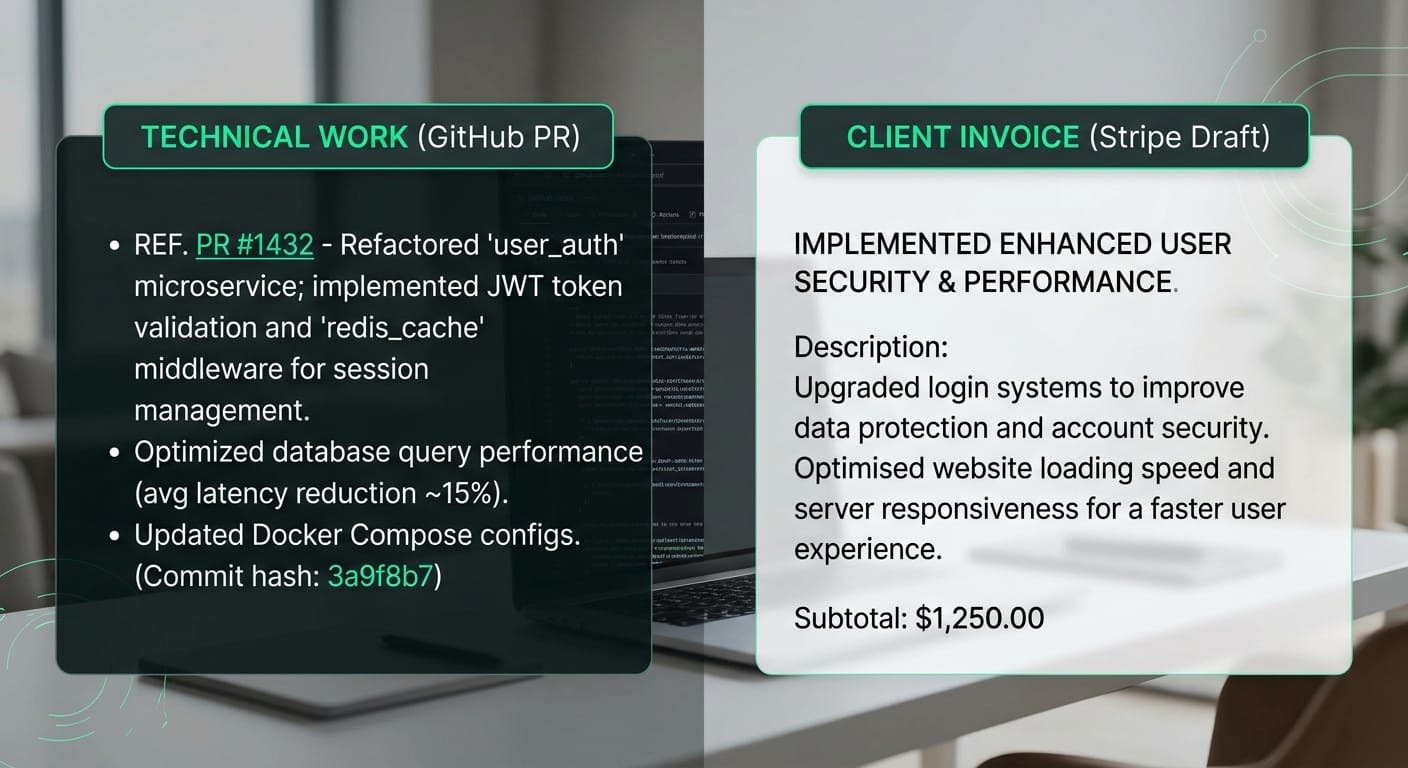
Manually translating technical work for client invoices costs the average freelance developer hours of unbillable admin time every month. Digging through old pull requests and rewriting complex backend updates into business jargon is tedious. Adopting developer invoicing automation strategies instead of a manual spreadsheet saves approximately 5 minutes per pull request and keeps your billing cycle running smoothly.
When you rely on a manual review process, you have to parse through weeks of Git logs to piece together a summary of your work. If your descriptions are too technical, client-side approvers might not understand what they are paying for. Most payment delays happen simply because invoices lack the precise, understandable details the person approving the invoice needs.
The benefits of an automated billing pipeline
Automated workflows eliminate this friction by pulling your merged code data directly into your billing software. When translating technical work for client invoices becomes an automatic billing ops process, you never have to guess how to explain a database refactor to an operations manager again.
Switching to an automated tool immediately improves your administrative efficiency and client relationships.
- Recoups billable hours: You skip the manual copy-pasting, spreadsheet formatting, and context-switching.
- Enhances transparency: Clients get a clear, business-focused record of the value you delivered, which actively prevents billing disputes.
- Accelerates approvals: Non-technical stakeholders can readily approve payments when they actually understand the line items.
Automate your technical translation with Diffbill
You can stop manually translating technical work for client invoices by connecting your code repository directly to your billing software. Diffbill automatically transforms your merged GitHub pull requests into professional, easy-to-read Stripe invoice drafts, saving you tedious administrative work every billing cycle.
A well-crafted transaction record enhances professionalism and speeds up your payment cycle, especially when you automate client invoicing from GitHub activity. Instead of agonizing over how to explain a complex database migration, Diffbill’s AI rewrites your technical jargon into clear, professional business language. Clients immediately understand the value of the work delivered, significantly reducing the chance of billing disputes.

Tailor the details to your client
Not every client needs the same level of granular detail on their monthly statement. Freelancers managing multiple projects can use advanced workflow automation features to control exactly how line items appear on the final bill:
- Per-client tone controls: Adjust the verbosity to suit a technical project manager or step it down to a high-level summary for a non-technical founder.
- Source-linked audit trails: Provide a direct link back to the original GitHub commit, ensuring absolute transparency.
- Keyboard-first workflow: Ra...