
How to Build a Custom Invoicing Engine: Architecture & Steps
A developer's guide to building a custom billing service, including system architecture, database design, and key components to integrate with payment gateways.
Learn the core architecture, essential features, and step-by-step process of building a custom invoicing engine—and discover when you should use an automated solution instead.
Core architecture of a custom invoicing engine
At its core, knowing exactly how to build a custom invoicing engine comes down to seamlessly connecting your scattered work inputs to a central payment gateway. The underlying architecture relies on three main pillars: a client context database, an automated line-item generator, and a localized pricing processor.
Key Takeaways
- Invoice generation requires a reliable data source (like Google Sheets, custom databases, or GitHub APIs).
- Tax and pricing logic must handle complex, multi-tier client configurations.
- Audit trails are critical for dispute resolution and financial compliance.
Your custom invoicing engine first needs a reliable way to ingest billable events. For some freelancers, this means fetching logged hours from a simple Google Sheet or a connected BigQuery table, an approach highlighted by Source 2. For independent developers, ingestion usually involves pulling merged pull requests directly from GitHub APIs if you want to how to automate invoicing from a GitHub repo and automatically generate descriptive line items.
Syncing rules, taxes, and payment gateways
Once your system gathers the raw work data, it has to accurately calculate the final cost. This processing layer handles complex multi-tier pricing for global clients and localized tax rules, which Source 3 notes is essential for scalable billing configurations. You have to build robust conditional logic to map different hourly rates or fixed fees to specific work categories.
Finally, your custom invoicing engine has to actually collect the money and record the transaction. Building this out from scratch requires rock-solid API handling to ensure the resulting billing data stays perfectly synced with your accounting ledger. If the connection drops or a webhook fails, you run the risk of sending duplicate invoices—which makes implementing proven developer invoicing automation strategies critical to maintaining sync with external payment services like Stripe.
Essential features your billing system needs
When mapping out how to build a custom invoicing engine, your software needs foundational compliance and workflow features right out of the gate. Before you write any code, you must plan for dynamic client connections, payment status webhooks, and source-linked audit trails.
Generating a simple static PDF is not enough for a modern financial tool. Your architecture must handle state changes automatically, seamlessly tracking when a bill moves from a pending draft to securely paid. While some freelancers start by just logging hours in a spreadsheet connected to a cloud database, a reliable billing tool requires dedicated schemas for client relationships and variable terms (Source 2).
Core architectural requirements
| Feature | Why it matters |
|---|---|
| Multi-tier pricing | Handles global clients, varying retainer models, and custom hourly rates. |
| Source-linked audit trails | Connects invoice descriptions directly to verifiable work (e.g., specific commits or PRs). |
| Secure API gateways | Safely routes data to payment processors like Stripe without exposing sensitive credentials. |
As your application scales to support multiple accounts, you will need to build in complex multi-tier pricing alongside strict audit logging (Source 3). Without an audit trail, clients cannot verify what work corresponds to specific invoice line items. Learning how to create client-ready invoices from GitHub by connecting your billing descriptions directly to your underlying source code or issue trackers ensures complete transparency and prevents scope disputes.
Figuring out how to build a custom invoicing engine ultimately means prioritizing automated data flows over manual data entry. By relying on secure endpoints to process payment processor webhooks, you effectively eliminate manual billing errors and keep your workflow perfectly synced with actual revenue.
Steps to build a simple invoicing system
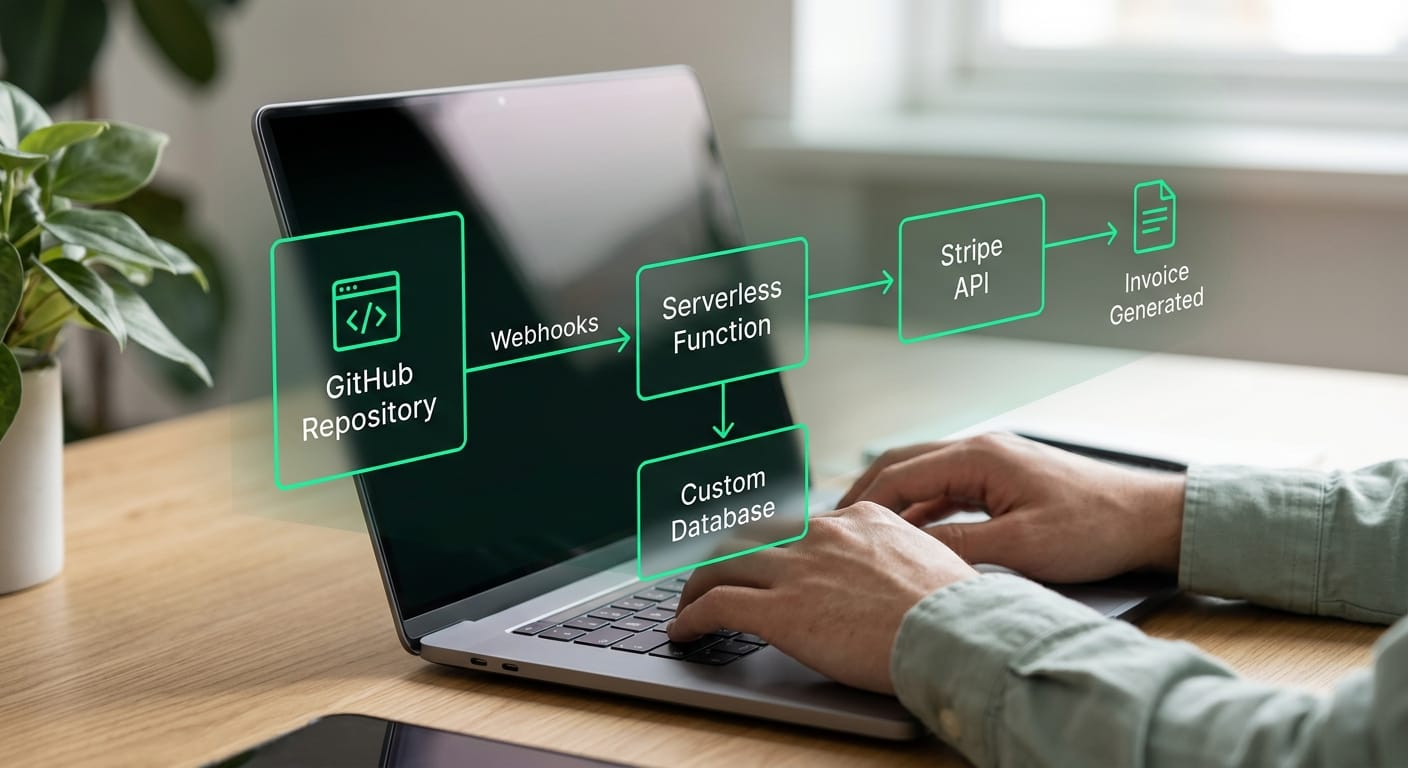
To understand how to build a custom invoicing engine, you need to map your data flow from the initial work trigger to the final payment request. A functional billing system connects your raw activity logs to a secure transaction gateway, removing the friction from your underlying administrative tasks.
Most bespoke solutions rely on a layered architecture to keep data clean and processing secure. As noted by developers in Source 2, you typically start by organizing a single source of truth for your billable hours, project names, and tasks. Once your database is structured, a serverless function or backend service can handle the math by aggregating unbilled work and passing the payload forward.
Core execution phases
Organize your data layer
Set up automated triggers
Format and aggregate data
Integrate a gateway API
Decoupling your internal business logic from the actual transaction processor keeps your technology stack lightweight. By handing off PCI compliance and secure checkout to a dedicated platform, your custom code only needs to format the correct line items. This approach gives you full control over how you track source code contributions without taking on severe security liabilities.
The hidden costs of custom billing software
Figuring out how to build a custom invoicing engine might sound like a fun weekend project, but maintaining it is a massive drag on your productivity. The reality is that building your own financial software introduces significant unbillable administrative overhead. Independent developers consistently lose more money patching a DIY billing system than they would by simply choosing one of the best invoicing apps for solo dev shops to avoid overhead.
While stringing together a simple script and a connected spreadsheet feels fast initially (Source 2), the actual lifetime cost of a custom engine is hidden in its continual upkeep. Every time your payment processor updates their API or deprecates a webhook, your billing pipeline breaks. You also have to constantly patch obscure bugs in your PDF generation logic just to ensure an invoice looks professional before sending it out.
Scaling that custom logic introduces even more friction as your client base grows. Handling professional billing requires robust audit trails and the ability to manage complex multi-tier pricing structures (Source 3), which are incredibly difficult tasks to maintain from scratch. Every new edge-case in international tax law or localized pricing requires you to write, test, and deploy new code instead of focusing on billable client work.
Holding onto a custom-built solution often stems from a desire for full control, but the maintenance math rarely works out in a developer's favor. Your primary focus should be catching up on a backlog and shipping high-quality code, not maintaining a brittle internal utility just to get paid. Retiring your homegrown system eliminates these hidden administrative costs and instantly recovers those lost billable hours.
Automate your billing engine with Diffbill
If you are researching how to build a custom invoicing engine, the hard truth is that engineering and maintaining your own pipeline rarely pays off. Instead of writing custom scripts to connect spreadsheets and databases like some developers do (Source 2), you can use an automated solution to generate professional invoices in minutes.
Many freelancers lose unbilled hours trying to develop a custom invoicing engine from scratch. You have to manage data tables, handle complex pricing tiers, and build secure API connections to payment gateways (Source 3). Every hour you spend maintaining an in-house app is an hour you aren’t shipping code for a client.
A bespoke pipeline out of the box
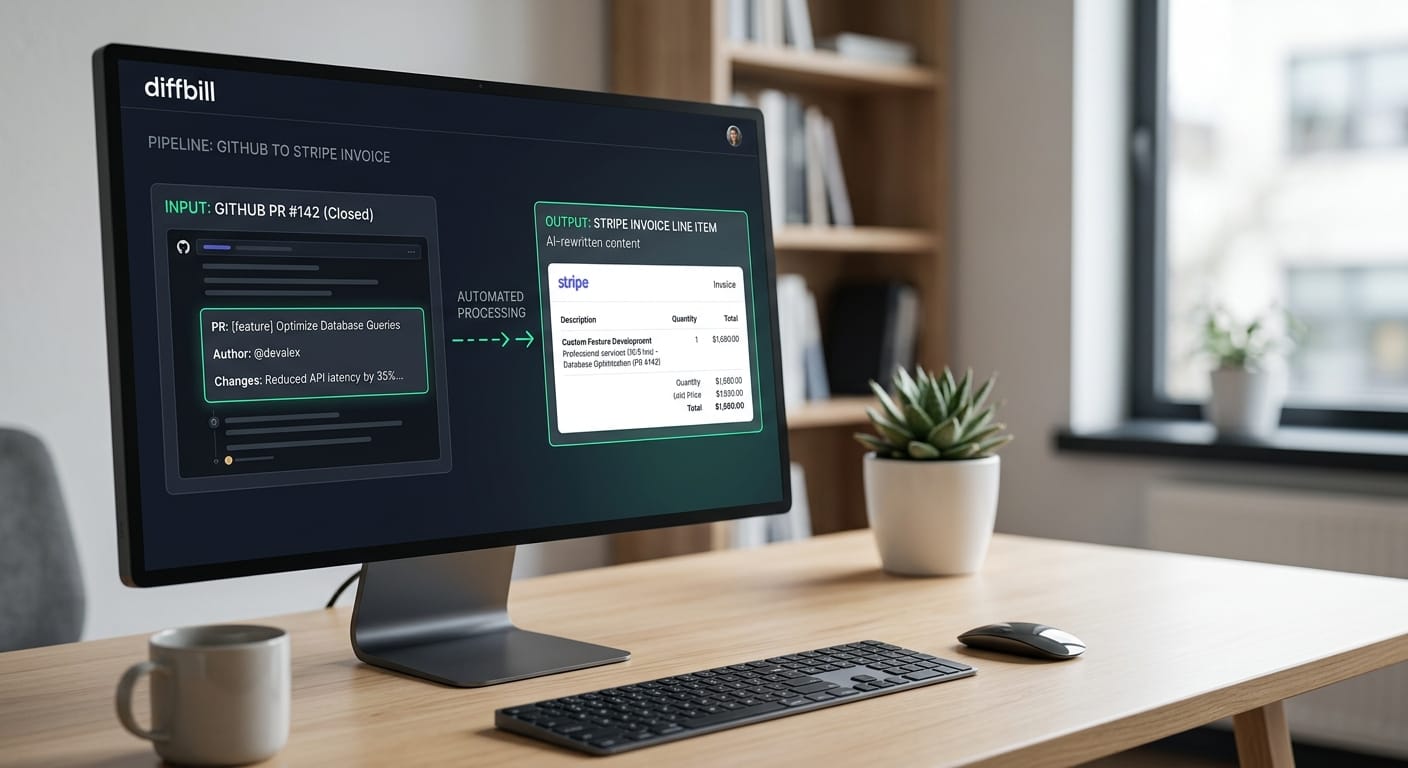
Diffbill gives you the exact automation workflow you need without the technical debt. It seamlessly transforms your merged GitHub pull requests directly into client-ready Stripe invoice drafts.
This robust approach provides massive workflow efficiency for freelancers:
- AI-powered rewriting: Automatically translates technical work for client invoices, turning highly technical commit messages into polished, professional language clients easily understand.
- Source-linked audit trails: Maintains a transparent, verifiable link between the final billed line item and the original code you shipped.
- Keyboard-first workflow: Lets you review, edit, and approve line items at lightning speed without taking your hands off the keyboard.
You do not need to engineer a custom invoicing engine from the ground up to get total control over your freelance administration. You can get the efficiency of a tailored setup immediately, equipped with advanced workflow automation, per-client tone controls, and custom branding removal.
Start billing
Frequently asked questions about billing development
Understanding exactly how to build a custom invoicing engine comes down to choosing the right tech stack, structuring your relational data accurately, and handling security protocols. Most developers face the same core engineering challenges when designing these systems, from mapping dynamic pricing structures to generating compliant audit trails.
Common architectural challenges
When moving beyond basic spreadsheet tools, systems architects have to account for growing transaction complexity and strict data integrity. According to Source 3, managing complex multi-tier pricing arrays for global clients is a primary hurdle in enterprise billing development. To solve this, technical teams often implement the following structural patterns:
- Decoupled databases that cleanly separate raw time-tracking events from finalized, immutable invoice records.
- Automated staging workflows designed to reduce manual billing errors and speed up recurring enterprise payment cycles.
- Custom content types and low-code prototyping platforms to map out relational data before writing heavy backend logic, as highlighted by Source 4.
When building lightweight invoicing tools for minimalists, developers frequently rely on much simpler pipelines to get the job done quickly. For example, connecting a standard Google Sheet directly to BigQuery can serve as a highly effective, low-maintenance backend for tracking client hours and organizing data (Source 2). However, as your transaction volume and client base scale, you will eventually need dedicated relational databases and structured backend routing to maintain stability.